Easy access to Chrome applications
Chrome Web Store Launcher was a Chrome extension developed by Google designed to provide streamlined access to installed Chrome apps. It served as a centralized hub for managing and launching apps that enabled users to quickly open their favorite tools and discover new ones without navigating through multiple menus. This extension simplified app management and browsing through consolidating essential functions into a single interface that enhanced efficiency for users.
Top Recommended Alternative

A centralized hub for app management
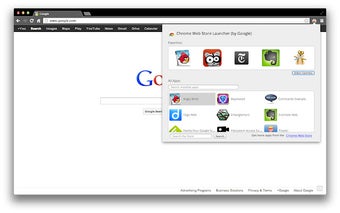
The launcher allowed users to pin chosen applications to the launcher’s interface for quick and immediate access. This capability helped users launch frequently used applications quickly without the need to sift through their entire app list. The extension’s centralized design improved app organization and provided a straightforward experience for accessing and managing Chrome apps. The extension required the Google Chrome browser to be installed on an operating system that supported Chrome Packaged Apps to run. The Chrome Web Store Launcher consolidated essential app management tools into one extension, helping users save time and effort by simplifying access to installed and new applications.
Efficient discovery and built-in browsing
A key feature of this extension was its built-in search function that was primarily used for searching installed apps within the launcher, and for discovering new Chrome apps directly from the launcher interface. This integrated search removed the need to open a separate browser tab when looking for additional applications Additionally, users accessed the full Chrome Web Store directly from the launcher, allowing seamless browsing of the entire app catalog without disrupting workflow.
The interface was a grid-based pop-up window accessed through the browser icon. The displayed application icons were a clean and minimalist style that was consistent with early Chrome designs that prioritized function over aesthetics, reducing visual clutter. However, the program has long since been retired, since the Chrome Apps ecosystem that it was designed to support is now obsolete and is no longer available.
Streamlined Chrome app access and management
Chrome Web Store Launcher offered efficiency granting the capabilities of quick app launching and discovery. It eliminated unnecessary complexity by providing a simple way to organize and access favorite and installed apps. The presence of search and direct store access enhanced the overall experience, making this extension a useful utility for users seeking an efficient method to manage their Chrome apps.